min
How we Built TRM MCP to Enable our Customers’ Compliance Agents
Compliance agents need more than API access: TRM MCP adds investigation-step tools, user-scoped sign-in, and analyst-approved writes
Key takeaways
- TRM's MCP server lets an analyst's own AI agent work with TRM data, with each tool built around one step of an investigation, such as pulling the context for an alert
- Calculations stay in TRM's API rather than in the MCP server, so the agent's answers match what the TRM API and web app show
- The server calls the API using only the signed-in user's credentials and holds no shared credentials
- Any write, such as dismissing an alert, runs only after the analyst reviews and accepts it in their client
- TRM tests the tools by running real AI models through investigation scenarios, checking that the agent picks the right tool, works in the right order, and waits for approval before a write
In July of this year, we launched the TRM Model Context Protocol (MCP) server, which enables TRM Transaction Monitoring customers to work with TRM’s blockchain intelligence through their own AI agents. We went from kickoff to launch in about two months, and we’ve since added enhancements, including expanding to cover TRM Wallet Screening.
The MCP is designed to enable collaboration between three parties in any compliance investigation: The human analyst asks the questions and makes the decisions. Their agent handles the routine, repetitive work of running requests and collecting results. The MCP server gives that agent structured, permissioned access to TRM data. Here’s how we built the server side of that relationship.
Why MCP
MCP is an open standard for connecting AI applications, such as Claude or ChatGPT, to external data, tools, and workflows.
TRM’s API gives developers precise access to our blockchain intelligence, and it remains the foundation for everything the MCP server does. MCP lets us ship context alongside the data.
An agent needs to know what to look at first, how to read a risk level, and how to describe a finding clearly and factually. With the MCP, we deliver that knowledge through the protocol itself, in three places. The tool manifest tells the agent what each tool is for. Skills walk it through common investigations. Server instructions set the rules for every session.
Because this context lives on the server, every customer’s agent gets the same guidance. Customers can rely on TRM’s guidance instead of writing and maintaining their own prompts.
When we improve a workflow, every connected agent gets the improvement.
What an investigation looks like
Here’s an abbreviated exchange from a staging organization. The analyst types in plain language, and the agent chooses the tools.
> What are my top 3 open alerts?

Here are your top 3 open alerts, sorted by severity:

 ID        Chain  Value  Date        Rule
 ALERT-01  btc    ~$19k  2026-09-28  Indirect exposure to high or severe risk
 ALERT-02  btc    ~$19k  2026-09-28  Counterparty risk indicators
 ALERT-03  btc    ~$2k   2026-09-27  Indirect exposure to high or severe risk
> Can you tell me more about ALERT-03?

This alert fired because the receiving wallet, ADDR-1, has indirect links to
sanctioned entities. ADDR-1 belongs to a large exchange (Entity A), and the
exposure transfers I checked date from 2019–2021.

 Direction  Category   Volume
 Incoming   Sanctions  $5,294
 Outgoing   Sanctions  $10,834

Example path (2 hops, 2020): ADDR-1 → ADDR-2 → ADDR-3, owned by Entity B (Sanctions).
The agent reports what the data shows, including the dollar volumes and dates of the exposure, and leaves the judgment to the analyst.
If the analyst then asks the agent to dismiss the alert, nothing is written right away: the analyst’s client shows a review prompt describing the dismissal and its justification. The dismissal goes through only when the analyst accepts.
MCP server "trm-mcp" requests your input

Review the alert disposition about to be committed.
action: Dismiss alert ALERT-03
justification: Indirect exposure dates from 2019–2021 and is low volume.
Accept to commit, or decline/cancel to abort.

❯ Accept    Decline
Architecture
Built on the official TypeScript SDK
We assessed several MCP SDKs and frameworks, including Python options like FastMCP, and chose the official MCP TypeScript SDK. It is a Tier 1 SDK, the MCP maintainers’ label for fully supported SDKs with complete protocol coverage, and it fits our team’s long experience running Node.js services in production. The server runs on TRM’s internal platform.
A thin layer around the SDK
We wanted an ordered middleware chain that can stop a call before it runs, for approvals and rate limits. We built that chain ourselves and kept every SDK import in a small framework layer, so an SDK upgrade touches only that layer.
Each tool is declared with a Zod schema through a small defineTool helper. The same schema is advertised through tools/list, and our tool reference docs are generated by starting the real server and reading that list, so the docs always match what clients see.
Tools call APIs, and APIs own the logic
A client connects to the server, and the server calls TRM’s API as the signed-in user. A tool may call several endpoints, but any calculation belongs in the backend API. Business logic lives in one place, and MCP answers match what the TRM API and web app show.
Designing the tools
TRM’s API and web app expose detailed blockchain intelligence. We designed the tools to package that intelligence around the way analysts really work. Each tool covers one step of an investigation, so the agent gets what it needs for the question in front of it.
The alert context tool shows this approach. An analyst’s first question about an alert is usually “what is this, and what parties are involved?” It gathers the alert itself, attribution for the addresses and entities involved, and whether the alert has since been invalidated. It returns one response with the counterparties, the matched risk indicators, and a plain description of the rule’s conditions.
Tools are namespaced by product, with a shared namespace for tools that more than one product uses.
Guidance that applies to every tool, like how to phrase findings neutrally, is served as a skill using the MCP resources primitive. Skill files for common investigation workflows are served the same way.
Sign-in
Users sign in with their existing TRM account. The server is an OAuth protected resource and publishes its metadata under RFC 9728, so clients can discover Auth0 and sign in directly using OAuth 2.1 with PKCE.
The server then exchanges the user’s token for one scoped to TRM’s internal API, using RFC 8693.
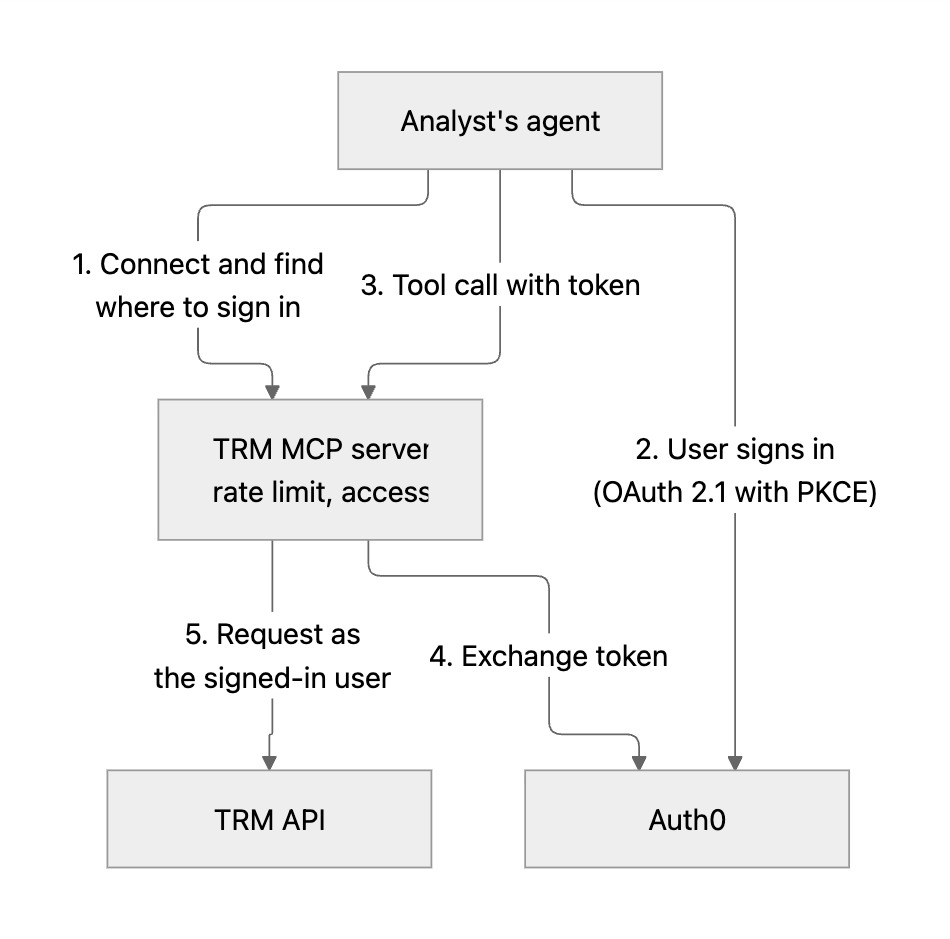
The server holds no shared credential for TRM’s API. Every upstream call carries the user’s own identity and permissions, so TRM’s API stays the trust boundary.
Customers connect through an agent of their choice, so the data the server returns flows to the model provider they’ve chosen to work with.
Keeping the analyst in control
Every write goes through MCP elicitation. Before the analyst dismisses or escalates an alert or changes a rule, the server shows a review prompt with what it’s about to do, and runs the write only if they accept. If a client can’t show that prompt, the server doesn’t write.
The agent reports findings, and the analyst makes the call. An investigation language guide, served alongside the tools, tells the agent to describe what the data shows accurately and neutrally.
Guardrails
- Reducing prompt-injection risk. Tool responses often include text that other people wrote, like rule names, labels, or earlier justifications. The server normalizes that text and wraps it in tags. The server instructions tell the model to treat anything inside those tags as data and never follow it as an instruction.
- Scoping data to the investigation. Tools that return rich data need an identifier from an earlier step, so they only return data for work that is under investigation.
- Rate limits. Limits apply per user and per organization, based on the verified identity in the user’s token.
Performance
We load-tested the server before launch. Two design choices help in production:
- Bounded fan-out. Tools that call many backend endpoints cap how many run in parallel, and a limit on upstream requests in flight across the whole process protects the services behind us.
- Measuring our own overhead. Each tool call emits OpenTelemetry metrics for tool duration and upstream duration. The difference is the server’s own overhead, which tells us where to look when a call is slow.
Testing how agents use the tools
Whether an agent picks the right tool for an analyst’s question shows up only when a real model uses the tools, so our CI runs several kinds of checks:
- Scenario evals. More than 20 scenarios give a real model the real tool schemas and skills, with fixed tool responses. They check that tool descriptions and annotations steer the model toward the correct tool and guide how it uses the tools: calling them in the correct sequence, passing the right inputs, and reporting the output faithfully. For example, one scenario gives the model an alert whose rule was later edited and checks that it explains why the alert is no longer valid.
- Rubric review. A model assesses the text content of the tool manifest and skill resources using our defined set of rules for writing style and content. Among other rules, descriptions should follow a consistent structure and writing style, use clear language, and avoid internal jargon.
- Skill invocation. A real client and model confirm that the right skill loads for a prompt. Negative controls check that unrelated prompts load no skill and call no tool.
- Journeys. A dozen full workflows run against a seeded staging organization, with writes intercepted as dry runs. A stronger judge model grades each one, and high-stakes journeys need two judges to agree.
Together, these checks cover different facets of the MCP server’s design and of how the client model behaves when it uses the server. Scenario evals focus on whether the tool manifest gives the model the right context. Journeys run the whole workflow against real API behavior, including whether the agent waits for the analyst’s approval before a write. We built the harness in-house, so there was no new service to run.
In action
The TRM MCP server now offers 23 tools across TRM Transaction Monitoring, TRM Wallet Screening, and a shared set for risk and exposure. Since launch, API customers have been using TRM MCP to automate larger parts of their investigation workflows, triage and disposition alerts, and manage their alerting settings.
Roxom, a South American crypto business building Bitcoin-based capital markets, uses TRM MCP for the onchain step of its AI agent for anti-money laundering (AML) investigations, and a person reviews each outcome.
What we revised
We first named each tool after what it does, like “get open alerts”. That worked while the server covered only Transaction Monitoring. When we added Wallet Screening, we wanted both products on one server without blurring their workflows, and plain names no longer showed which product a tool belonged to. So we gave every tool a product prefix, with one for Transaction Monitoring, one for Wallet Screening, and a shared one for tools that both products use.
The longer names had a cost. Clients add their own prefix to each tool name, and a model provider can reject a whole tool list if one name is too long. We now enforce a length limit on every tool name.
What’s next
Next, we’re expanding tool capability in response to product feedback, testing the server with more client agents, and tracking newer versions of the MCP protocol.
What we’d tell another team
- Design tools around the job. For complex workflows, map each tool to a step in the user’s workflow.
- Design for extensibility. Invest early in a framework and test harness that make adding new tools simple.
- Keep business logic in your API. The MCP server should shape and combine data, and your API should do the calculation.
- Keep the user in the loop. Show the user exactly what a write will do, and run it only after they accept. If the client can’t show that, don’t write.
- Use model-based evals. Agentic products need agentic validation. Drive a real model through your tools, the same way your users’ agents will.
To learn more about what TRM MCP can do, visit the TRM MCP product page.